For years Apple has been selling an M1 Apple MacBook Air for $649 via Walmart. It was still using the old wedge case design and is literally unchanged from fall of 2020 when it came out. It was the base model with 256 GB storage and 8 GB of RAM model, no upgrade options, no colors.
The price point was designed to get customers who would not pay for a $1000 computer into using a Mac. Sourcing those 2020 era M1 components, screens, etc, let alone M1's, was probably becoming a problem in 2026.
The Macbook Neo is a modern way to meet that price point. The video ad is more instructional about what macOS is, and how it would work with an iphone the customer may already have.
It does very basic Apple Intelligence (they show the photo editing in the video), but this is not for running models locally (they even show the ChatGPT native app and say "runs all your favorite AI apps")
People complaining about the 8 GB limit are missing who the target market is for this machine. Its a Mac, for $599!
You're highlighting Apple's strategy very well, with one omission: the M1 Macbook Air at Wal-Mart was US only. Even next door in Canada with the same retailer, Wal-Mart didn't have that deal.
This is the M1 Macbook Air deal for the rest of the world as well as the US. This is huge, it's the cheapest Mac laptop of all time. Apple Silicon is paying dividends!
My first Mac was a Mac - ie the first Mac. 128k of memory and $1000 (with the student discount!) in 1994.
I've had every architecture of Mac since then - except for M.
This one might just have inspired me to try a Mac again - if it had an M.
I didn't realize that. I thought it was a different architecture - or different enough that the two couldn't run the same binaries. Are they indeed binary compatible?
Yeah theres very little difference at this point between the A and M lines, think of the M as just being the more powerful line, but that doesnt make the A line weak, not by any stretch. Both are completely binary compatible at this point.
The A18 Pro single core performance is on-par with the M4 (a smidge lower but barely anything in it), and outperforms the M3.
So what if it's a Mac, applications suddenly don't need as much memory? Can it open a table with a gazillion rows? Can it open ten tens if not hundreds of web pages? Can it run multiple programs at the same time? Having only 8 GB sucks unless you're using it as a terminal or media player.
I have used a M1 MacBook Pro, 16 GB, as my dev daily driver for many years. I generally never need to close any application.
Typical sample of apps concurrently in use:
- PostgreSQL (server)
- TablePlus (db client)
- Docker
- Slack
- Chrome
- Safari
- Zed
- Claude native
- ChatGPT native
- Zoom
- Codex
- Numbers
- Calendar
- the whole stack for whatever app I am building (Redis, Node, Rails, etc.)
With that persistent stack running, I can pretty comfortably launch whatever other apps I want to use: Office, Music, etc. I only see a beachball when I launch an Office app (they may not be native yet, I suspect it's emulating from x86).
I was skeptical that 16 GB would be enough. I bought this fully expecting to return it and buy one with more RAM. The Apple Silicon Macs are much more efficient with memory than even the Intel Macs. I believe some tech articles have been written on the why/how, but in practice you just don't need as much RAM as you think on Apple Silicon.
I have an M1 with 8GB and M2 with 16GB, and they are not comparable. I once ran the M2 smoothly for over 250 days without reboot with a bunch of applications open the whole time (at some point it just force-rebooted, fair enough). On the other hand I regretted the 8GB on my M1 Mini every time I used it.
8GB is perfectly fine for light use, but I'd argue if that's enough then you don't need the power of an M1+ processor either. So 8GB in the Neo and 16GB by default in everything else sounds more sensible than what M1 started with.
I’m confused, you’re talking about 16 GB of RAM but OP said:
Having only 8 GB sucks unless you're using it as a terminal or media player.
I have the M1 MacBook Pro with 16 GB too and it’s fine for normal web development and multi tasking but that … really isn’t surprising?
I still regularly use a five year old Ideapad 14 Pro with 16 GB of RAM running Windows 11 and it’s also completely fine for dev work running servers/Docker/WSL2 VM/etc locally.
> I’m confused, you’re talking about 16 GB of RAM but OP said:
Having only 8 GB
Look at the list of things they said they have open. Divide in half and it's still a lot because that set of running software is very hungry. PostgreSQL, Slack, Docker, Brave, Cursor, and iTerm2 running on my system puts RAM usage at 23.5GB, and yet modern macs have both very good memory compression and also extremely fast swap. Most Mac users will never realize if they've filled RAM entirely with background software.
Thanks, I can see the point being that a smaller subset of that would work on 8 GB, but I don't think you can really just divide by half? (Considering a much larger portion of the 8 GB would be dedicated to base OS/unified GPU needs compared to the 16 GB model).
e.g. using hypothetical numbers: if base MacOS/typical GPU usage requires 4 GB, then the 8GB model would have 4GB available for running apps (but multiplied by memory compression/swap to fast SSD). Whereas the 16GB would have a much more comfortable 12 GB for multi-tasking in that scenario especially with the multiplier effect of compression/fast swap on top.
So it still feels like a bit of an apples to oranges comparison as far as what an 8 GB model could handle in real usage. I have a friend who does light dev work on an M1 Macbook Air so I don't think an average user would have issues on the Neo day to day, but using the 16 GB as a yardstick doesn't seem that useful.
> Considering a much larger portion of the 8 GB would be dedicated to base OS
Sure, but, by the numbers I'm seeing, their much heavier load than mine would be waaaay into swap territory for them and is still doing just fine. That's really my point. That's why I think it's actually pretty reasonable to look at half their load and say "man, even half their load is a pretty heavy load for most people, so half their RAM will almost certainly be more than plenty for the target market".
Also, just for the info, my Activity Monitor says that the non-purgeable OS RAM (wired) usage is around 3GB on Tahoe 26.3.
Guess what? Both Windows 10+ and Linux have memory compression, too, yet 8 GB are good only for light usage unless you're willing to "destroy" the flash with intensive swapping.
Sorry, I should have said that running that same stack on Windows/macOS Intel with 16GB resulted in tons of sluggishness in my experience. I would consider that a 32GB workload on Intel, so I was surprised that 16GB was enough for it.
To the major point of can it (Neo 8GB) run multiple programs at the same time, my experience would say it would have no issues doing so given what one can do in 16GB on lesser Mac hardware. (Maybe I am wrong and MacOS takes all 8GB for itself, but that seems far-fetched.)
> Apple Silicon Macs are much more efficient with memory than even the Intel Macs
So either it has magic fairy dust, or more likely it swaps a lot, but thankfully today's flash is faster than yesterday's hard disk; though this intense usage will shorten its life. By the way I wonder if Apple will use cheap QLC for this.
macOS actually does the opposite; to avoid wearing down the drive it will hold 7-10gb of your most commonly used files in memory and release them when the memory gets allocated for something else. In theory you could get away with editing gigabytes of files and using dozens of apps without ever wearing down your drive at all.
Yes to all of the above. Macs swap incredibly well, and an M1/*gb mac is more than capable of having hundreds of chrome tabs open while running excel with giant spreadsheets.
As for "running multiple programs at the same time" - I assume you're leaning pretty far into hyperbole here given that machines with 1% of the resources of this one can do so...
As someone who used an M1 with 8GB and has hundreds of browser tabs I can assure you it is not enough and you'll have to restart the browser at least a few times per week to not make the whole system lag.
16GB is fine though, and makes a much larger difference in responsiveness than it looks on paper.
Clearly the target audience for this device are the 90% of users who are going to use this to watch YouTube, talk to ChatGPT and upload photos to Insta, or whatever the kids are doing these days. It’s not designed or marketed at power users, although my past decade plus experience with Macs is that they can stretch a lot further than their specs would suggest.
My daily-driver M2 16GB has been up for 54 days, running three web browsers simultaneously (all Firefox, which does help, about 30K tabs across them), plus a medium-sized Rails app and postgres, iTerm2 and tmux (about 38 panes), and the Slack (Electron!) app.
Current RAM usage is 6.14GB.
Things change when I run local LLMs or VMs or Xcode, of course.
There's a subset of people that likes collecting tabs and thinks it's some impressive measure and I've encountered them more and more recently, I guess as some attempt to brag that their computer can handle something? It's like saying you have 30000 pieces of junk mail in your living room. It's just sloppy.
30000 tabs is about 10x as many pages as there are in the entire Harry Potter series. Nobody remembers all pages in those series. Nobody remembers why they have 3000 tabs, much less 30000.
I noted the tab count because it's a weak measurement of memory requirements, which is directly relevant to the topic at hand.
I keep tabs because they're better in most ways than bookmarks. I'd be happy to expound on that opinion, but I suspect you're unreceptive.
FWIW, Firefox with Sidebery can handle more tabs than you or I need. Someday I'll clean them out, maybe, but I don't need to. Thanks to Mozilla, Apple, and Sidebery.
How do you use firefox? Once I get to the amount of tabs that I have to scroll through them I find it pretty necessary to close tabs otherwise the duplicates get out of hand
The Sidebery extension is the key, for me. Tabs are vertical, hierarchical, and searchable.
I also set the color of specific tabs (another Sidebery feature) that have some special returnability reason. I don't love the color options, nor the default ordering (would prefer the more traditional color spectrum order (red-blue or inverse) so that I could infer the tag/priority/etc from the color, but I only use a few colors and it's fine.
I don't have a problem with duplicates. If it's a page/app that I return to often, I know that and just jump to it. I'm sure I have some dupes hiding in there though. NBD.
I use tabs as temporary bookmarks. It's still a lot, sure, but it comes at no cost.
The browser with the highest tab count is the one I use for HN. 21708 right now. The oldest tab is about 3 years old, which reflects the last time I bothered to clean them up.
It's also a measurement of how many HN articles I read. About 20 per day, I guess. I don't usually close HN tabs when I'm "done" with them. I can't defend that practice, really. In the short-term, I might reload to see more comments. In the longer-term, there are some that I will want to revisit. Actually, for particularly relevant/useful comments, I reopen them in new child tabs, so that they're easy to find and see responses to. This inflates my overall count.
Anyway, older tabs scroll off my sidebar viewport and I can mostly forget about them, but I don't want to simply close them all. Obviously the vast majority are closeable, but again, keeping them around has zero cost.
Someday I'll winnow them and sweep the remainder into (real) bookmarks. Or maybe I won't -- it makes little difference, as it turns out.
I am "only" ranging around 800-2000 tabs and 95% of them are practically bookmarks that aren't hidden in some menu but visible in the same visual context as everything else, which feels more natural to me. They're not loaded in RAM anyway.
The brain is amazing at remembering the rough location where I have tabs of a specific site/topic, so I just switch to the right window and scroll for a few seconds. Only works with a vertical tab bar though. It's not the most optimal solution but the best that actually exists and works smoothly.
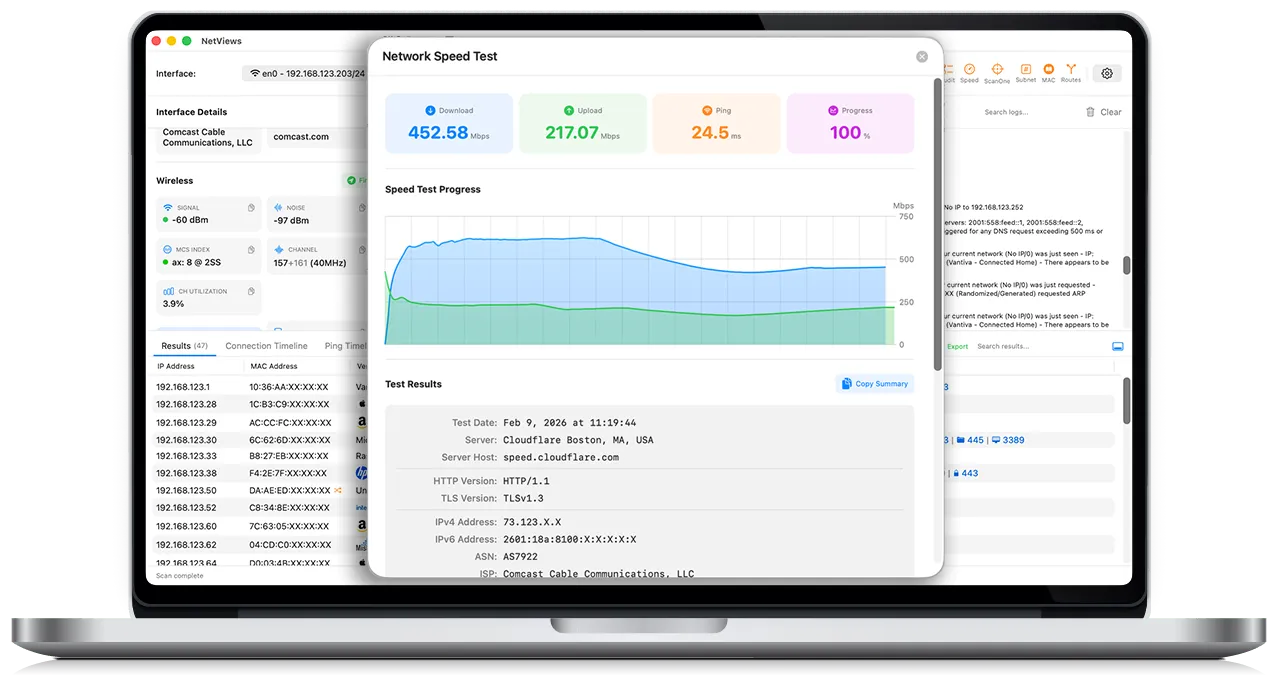
Minor bug: I tried opening the WebP screen shots in another tab so I could zoom and see them more clearly, and it does not work. Chrome renders the WebP image data as text, and Safari prompts you to download it. This appears to be because the web server is not returning a `Content-Type` header for these URLs:
Minor suggestion. I found this because the UI looked cool and I wanted to see a more zoomed in view of it. But right now the "Take control of your network today" is the only place with a really readable view of the UI. Perhaps add a gallery of screen shots, showing off different features?
Really cool to see this come back after the first pass. I always wonder if an interesting project will be seen again after someone asks for feedback. I'm really happy that you're back to show progress on this and will give it a test run tomorrow to maximize the seven day demo.
I chose this particular point to comment to further encourage a screenshot gallery and to mention that Help is a section I'm unlikely to open unless I'm learning about an API. Just wanted to share why I wouldn't have found that screenshot without you pointing to it.
There are real problems with the Torrent files for collections. They are automatically created when a collection is first created and uploaded, and so they only include the files of the initial upload. For very large collections (100+ GB) it is common for a creator to add/upload files into a collection in batches, but the torrent file is never regenerated, so download with the torrent results in just a small subset of the entire collection.
The solution is to use one of the several IA downloader script on GitHub, which download content via the collection's file list. I don't like directly downloading since I know that is most cost to IA, but torrents really are an option for some collections.
Turns out, there are a lot of 500BG-2TB collections for ROMs/ISOs for video game consoles through the 7th and 8th generation, available on the IA...
Is this something the Internet Archive could fix? I would have expected the torrent to get replaced when an upload is changed, maybe with some kind of 24 hour debounce.
It sounds like they put this mechanism into place that stops regenerating large torrents incrementally when it caused massive slowdowns for them, and haven't finished building something to automatically fix it, but will go fix individual ones on demand for now.
I built and run a search engine and a "Wayback Machine" for Gemini:
gemini://kennedy.gemi.dev
There are ~4K hosts and ~1M documents/images/files which make for nice playground with experimenting with crawlers, indexers, and more. Its a nice hobby. Lots of primarily static sites, and CGI is used to add some interactivity:
In the early to mid 2000s I would believe this. But for a major e-commerce provider in 2012? That seems vanishing improbable.
PCI DSS is the data security standard required by credit card processors for you to be able to accept credit card payments online. Since version 1.0 came out in 2004, Requirement 4.1 has been there, requiring encrypted connections when transmitting card holder information.
There’s certainly was a time when you had two parts of a commerce website: one site all of the product stuff and catalogs and categories and descriptions which are all served over HTTP (www.shop.com) and then usually an entirely separate domain (secure.shop.com) where are the actual checkout process started that used SSL/TLS. This was due to the overhead of SSL in the early 2000s and the cost of certificates. This largely went away once Intel processors got hardware accelerated instructions for things like AES, certificates became more cost-effective, and then let’s encrypt made it simple.
Occasionally during the 2000s and 2010s you might see HTML form that were served over HTTP and the target was an HTTPS URL but even that was rare simply because it was a lot of work to make it that complex instead of having the checkout button just take you to an entirely different site
> Their response was better than 98% of other companies when it comes to reporting vulnerabilities. Very welcoming and most of all they showed interest and addressed the issues
This was the opposite of a professional response:
* Official communication coming from a Gmail. (Is this even an employee or some random contractor?)
* Asked no clarifying questions
* Gave no timelines for expected fixes, no expectations on when the next communication should be
* No discussion about process to disclose the issues publicly
* Mixing unrelated business discussions within a security discussion. While not an outright offer of a bribe, ANY adjacent comments about creating a business relationship like a sponsorship is wildly inappropriate in this context.
These folks are total clown shoes on the security side, and the efficacy of their "fix", and then their lack of communication, further proves that.
During my last semester at Georgia Tech, I had one remaining 3000-level English credit I needed to graduate. During the last week to register, I quickly found an open class titled "Modern Authors" and signed up.
But when I attended the first day, I learned that Gatech's online registration system had truncated the class title. The full title was "Modern Authors: James Joyce", and I was the only engineering student in a semester long class about James Joyce, which I had to take it and pass in order to graduate.
It was... pretty good actually.
Portrait of an Artist as a Young Man was enjoyable, as were his short stories. His style was unlike anything I had read before and it was musical in a way. However, I found Ulysses impenetrable: It rambled, and was difficult to understand what was even being described in the text, let alone the significance of it. Mostly it was just strange. Thankfully the majority of your grade was based participating in class discussion. Talking about it, seeing how confused everyone else was, and trying to make sense of it all together was a fun way to spend an afternoon in Skiles.
I am trying to read Portrait of an Artist as a Young Man right now, but the 19th century Irish-isms keep kicking me off the flow. I can't concentrate on the story with so many unknown words, people and events.
There are explanatory notes, but reading them precludes immersion, and not reading them precludes comprehension.
No, for the love of God don't try Finnegan's Wake. Take the 25 bucks you would have used to buy it online and do something better with it, like burning it in the trash can, or buying a North Korean memecoin with it.
Message: DISPMORNING. NEED LEO TO MEET THE AC. A PAX WAS INAPPROPRIATELY TOUCHING ANOTHER PAX IN THE ROW INFRONT OF THEM. THE FAS HAVE THE SEAT NUMBER ANDMANIFEST. FYI AND THX


https://sixcolors.com/post/2026/03/apple-introduces-colorful...
Single Core performance: the A18 Pro is faster than an M3!
Multi Core performance: The A18 Pro is essentially the same as an M1.
This balance seems right for the target market of a $599 laptop.
reply